
Secure Check Printing Logo
Home
• Software Features• View Demo
Pricing
• Blog• Comparisons• Guides / Tutorials
• FAQ• Contact Us
About
DemoMy account
Secure Check Printing Logo

Improve efficiency, provide a better Customer experience with modern Technolo services available.

Secure Check Printing Logo
Home
Secure Check Printing Logo
Features
Secure Check Printing Logo
Pricing
Secure Check Printing Logo
Faqs
Secure Check Printing Logo
About
Secure Check Printing Logo
View Demo
Secure Check Printing Logo
Blog
Secure Check Printing Logo
Comparisons
Secure Check Printing Logo
Guides / Tutorials
Secure Check Printing Logo
Contact
support@securecheckprinting.org
+1 (682) 458-1476
Secure Check Printing Logo
Terms & Conditions
Secure Check Printing Logo
Privacy Policy

© Copyright Secure Check Printing . All Rights Reserved

Guide/TutorialsGuide/Tutorials

HomeGuide/Tutorials
• Getting Started• Installation & Setup• Registering Your License• Starting the 10-Day Trial• Adding Corporations• Adding Bank Accounts• Creating Payees• Printing Checks• Printing Deposit Slips• Password Recovery & Security Questions• Profile & Backup Options• Migrating or Restoring Data• License & Activation Management• Deactivating the Software

🎁 Starting the 10-Day Free Trial

Step 1 — Choose “Start 10-Day Trial”

If you want to explore the software before purchasing, simply click Start 10-Day Trial on the final Welcome panel. You’ll be redirected to the registration page to create your trial account.
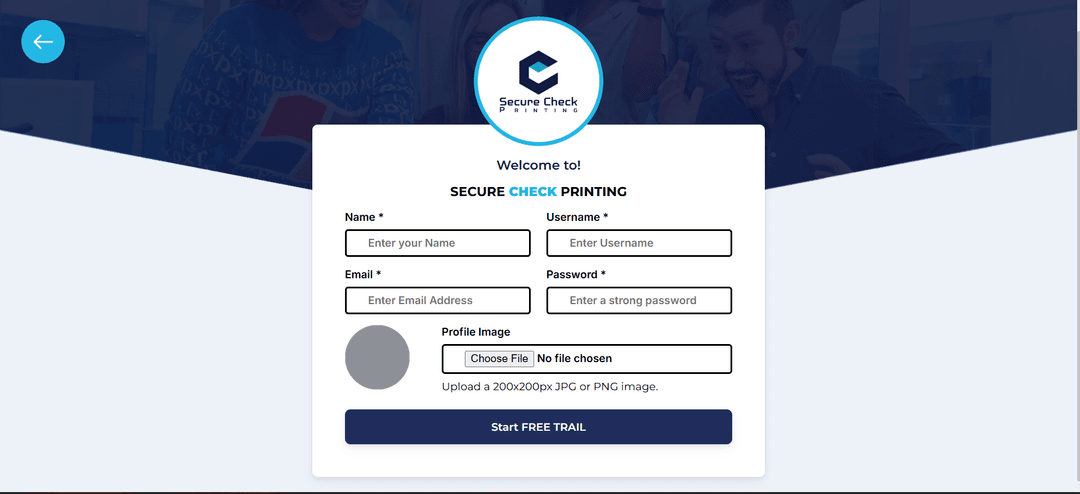
demo register

Step 2 — Register for the Trial

Use your real, accessible email address — it’s required for activating your trial and later upgrading to the full version.

Once you click Save, your free 10-day license will start automatically.

Step 3 — Enjoy the Trial Period

Your trial gives you full access to all software features for 10 days, completely offline. Use this time to explore every feature — from check printing to deposit slips — and see how everything works.

🕓 The trial is unique to your email and computer. Once it expires, it can’t be restarted or extended — even if you reinstall the app.

When you’re ready to unlock lifetime access, you can easily upgrade to the full version right from your account.